
Start your first SOP right now: open a blank document, add this one-line header, and fill in each field before you write a single step.
Title | Purpose | Owner | Trigger | Last reviewed
Then build the body with three things:
- Title + Trigger: Name the task precisely (“How to process a customer refund”) and state what kicks it off (“When a refund request arrives in the support inbox”).
- Owner + Access: Name one person responsible and list every login, file path, or tool they need before starting.
- Steps + Acceptance criteria: Number each action and add a one-line “done when” statement at the end so the person performing it knows when to stop.
Save the draft in your team’s shared drive or wiki, then ask the person who normally does the task to follow it cold. If they get stuck, that step needs rewriting. That test is the whole validation loop in miniature.
SOPs reduce variation, cut onboarding time, and make your business less dependent on any single person, including you. Penn State Extension’s SOP writing guide puts it plainly: people support what they help create, which is why involving the workers who actually do the task produces better documentation and faster adoption. The EPA’s SOP guidance adds that clear administrative metadata (title, effective date, author, approver, revision history) is what separates a living document from a forgotten file.
The most common failure modes are predictable. SOPs written at 30,000 feet with no named owner get ignored. SOPs stored in three different places get contradicted. SOPs handed to staff with no training or pilot test get filed and forgotten. The fix for all three is the same: write less, test early, assign one owner, and store in one place.
Pro Tip: Involve the person who does the task in the first draft session, even if they only talk while you type. That conversation surfaces the “gotchas” no manager-written SOP ever captures.
Key Takeaways
Well-written SOPs reduce variation, speed onboarding, and make your business transferable, but only when they are tested, owned, and stored in one searchable place.
| Point | Details |
|---|---|
| Start with one SOP | Pick the process where your absence causes the most disruption and document that one first. |
| Involve the doer | Have the person who performs the task draft or narrate the first version to capture real-world steps. |
| Name an owner | Every SOP needs one named person responsible for updates, questions, and version control. |
| Test before publishing | A new person should complete the task end-to-end using only the SOP; any stall means rewrite. |
| Dynamicgrowthsolutions AOS | The AOS framework builds a prioritized SOP library and delegation system for mid-market owners preparing to scale or exit. |
Table of Contents
- What format should your SOP use?
- Every SOP needs these core fields
- How to write steps people will actually follow
- How to develop, test, and roll out an SOP with your team
- Which tools and templates speed up SOP creation?
- How to keep SOPs from going stale
- A fillable SOP template you can use today
- When should you DIY SOPs versus hire help?
- Dynamicgrowthsolutions can help you build SOPs that stick
- Sources
What format should your SOP use?
Format choice comes down to two axes: how many decision points the process contains, and how many total steps it requires. Get those two numbers roughly right and the format picks itself.
- Step-by-step (linear): Best for short, repeatable tasks with no branching decisions. Think: opening the office, running a daily report, processing an invoice. Five to fifteen steps, one path.
- Hierarchical: Use when a process is long enough to need sections and subsections. A monthly close process with accounting, payroll, and compliance sub-tasks fits here. Each major phase gets a heading; each sub-task gets numbered steps beneath it.
- Checklist: Ideal for verification tasks where sequence matters less than completeness. Pre-flight checks, quality audits, and client onboarding confirmations all work as checklists. The reader ticks boxes; the format enforces nothing else.
- Flowchart: Reserve for decision-heavy processes where the next step depends on a yes/no answer. Customer escalation paths, return eligibility decisions, and approval routing are natural fits. Tools like Lucidchart or even a simple Google Drawing work fine.
- Graphic/visual: Works well for physical tasks where spatial orientation matters, like equipment setup or workspace layout. A labeled photo or diagram replaces three paragraphs of description.
When a process is both long and decision-heavy, use a hybrid: a flowchart that links out to individual step-by-step SOPs for each branch. That keeps the master document readable without burying the detail. For software tasks, a short Loom video walkthrough paired with a written step list beats either format alone, because the video shows the UI and the text gives the person something to search.
Every SOP needs these core fields
The EPA’s document control standard requires a consistent header with title, SOP ID, effective date, author, approver, and revision history. Long SOPs also need a table of contents. Below is a field-by-field reference you can copy directly into a template.
| Field | What goes here | Example |
|---|---|---|
| Title | “How to [verb] [object]” format | How to process a customer refund |
| Objective | One sentence: what this SOP achieves | Resolve refund requests promptly |
| Scope | What’s included and what’s not | Applies to online orders; excludes wholesale |
| Owner | One named person, not a role | Maria Chen, Customer Success Lead |
| Roles | Who else touches this process | Support rep (initiates), Finance (approves) |
| Ingredients | All tools, logins, file paths needed | Shopify admin, refund policy doc (Drive link) |
| Trigger | What starts this process | Refund request received in support inbox |
| Steps | Numbered actions, one verb each | 1. Open the order in Shopify… |
| Outputs | What “done” looks like | Refund issued, customer emailed, ticket closed |
| Quality controls | Error checks or approval gates | Finance approval required for high-value refunds |
| Exceptions | Known edge cases and what to do | Fraud flags: escalate to manager, do not refund |
| References | Linked policies, templates, or related SOPs | Refund Policy, Chargeback SOP |
| Revision history | Date, author, change summary | 2026-03-01, M. Chen, added fraud exception |
Pro Tip: The minimal metadata that prevents rework is: Owner, Trigger, and Revision history. Without those three fields on page one, the SOP will be rewritten from scratch the next time someone needs it.
How to write steps people will actually follow
The single biggest writing mistake is burying the first action under two paragraphs of background. Trainual’s SOP framework and Atlassian’s guide both make the same point: lead with the action. Context belongs below the steps, not above them.
Concrete writing rules:
- One action per step. If a step contains “and,” split it.
- Start every step with a verb: “Click,” “Open,” “Enter,” “Confirm.”
- Use plain words. “Send the email” beats “initiate the communication.”
- Name the owner per step when multiple roles are involved: “Finance: approve or reject within 4 hours.”
- End each step with a completion signal: “Done when the status shows ‘Approved.’”
Before and after:
Poor step: “The customer service representative should make sure that the refund has been processed correctly and that the customer has been notified through the appropriate channels.”
Well-formed step: “3. [Support rep] Confirm the refund status shows ‘Issued’ in Shopify. Done when the customer receives the automated confirmation email.”
The second version names the role, starts with a verb, and tells the person exactly when to move on.
Visuals checklist:
- Add a screenshot for any step involving a UI click or menu navigation.
- Use a numbered diagram for physical setups or spatial tasks.
- Embed a short Loom video (under 5 minutes) for software walkthroughs where sequence and speed matter.
- Add a flowchart only when the step branches into two or more paths.
Skip visuals when the text is already unambiguous. A screenshot of a “Save” button adds nothing.
How to develop, test, and roll out an SOP with your team
A well-written SOP that nobody tested is still a guess. The PLOS Computational Biology rule-based workflow recommends a structured process covering when to write, how to structure, how to test, and when to publish. Here is that process compressed into a practical rollout sequence.
- Identify the process. Prioritize tasks that are performed regularly, involve more than one person, carry risk if done wrong, or currently depend on one person’s memory.
- Capture the as-is process. Observe or record the person who actually does the task. Writing from memory misses the workarounds and edge cases that matter most to adoption.
- Draft the SOP. The subject matter expert (SME) or senior employee writes or narrates the first draft. If they can’t write it, record them doing the task and transcribe the steps.
- Peer review. A second person who knows the process checks for accuracy. A person who does not know the process checks for clarity.
- Pilot test. Have someone unfamiliar with the task follow the SOP alone, without help. Any step that stalls them needs rewriting. This is the acceptance criterion: the SOP passes when a new person can complete the task end-to-end without asking a question.
- Publish and train. Store the approved SOP in one searchable location. Brief the team in a short session; do not assume they will read it unprompted.
- Track adoption. Check whether the SOP is being used. A simple way: ask the owner to log any question they receive about the process. Repeated questions about the same step signal a gap.
Pro Tip: If the SME can’t find time to write, ask them to record a screen share or a phone video of themselves doing the task. That recording becomes the first draft. Transcribe the steps, clean the language, and send it back for a 15-minute review.
For teams working through adoption resistance, hands-on process simulation exercises can surface hidden blockers before a full rollout.

Which tools and templates speed up SOP creation?
The right tool depends on where your team already works, not on which platform has the most features. Start with what you have.
- Microsoft Word: The most portable format for printable SOPs. Word’s built-in heading styles and table of contents generator handle long, hierarchical documents well. Dozens of free SOP templates are available through Microsoft’s template library.
- Google Docs: Best for collaborative drafts where multiple reviewers need to comment simultaneously. Version history is automatic. Pair with Google Drive folders organized by department.
- Notion or Confluence: Good when SOPs need to link to each other and to related policies. Both support nested pages, which map naturally to a business process hierarchy. Search is strong in both.
- Canva: Useful for graphic SOPs and visual process maps, particularly for physical tasks or customer-facing procedures. Canva’s template library includes flowchart and process map layouts that non-designers can edit quickly.
- Loom or screen recording tools: The fastest way to capture a software task. Record once, embed the link in the written SOP, and the video becomes the visual layer without requiring a designer.
- Dedicated SOP platforms: When your library grows past 20–30 SOPs and version control becomes a daily problem, a platform built for procedure management adds real value. These systems handle access permissions, review reminders, and training confirmation in ways that Google Docs cannot.
Pro Tip: Pick one location as the single source of truth and make it searchable. A great SOP stored in the wrong folder is as useless as no SOP at all. Name files consistently: “SOP [Department] [Task] v[number]” so anyone can find them in a search.
For free templates, Penn State Extension’s SOP writing guide includes a downloadable template with all required fields. A usable template needs at minimum: a header with owner and version, numbered steps with verb-first language, and a revision history table.
How to keep SOPs from going stale
An SOP without a named owner and a review date is a document on a countdown clock. The PLOS rule-based workflow treats review and publishing as formal steps in the SOP lifecycle, not optional afterthoughts.
Review cadence:
- Active SOPs (used weekly or more): review quarterly.
- Stable SOPs (used monthly or less, low-change environment): review every 6–12 months.
- Immediate review triggers: a process change, a regulatory update, a repeated error, or a new tool replacing an old one.
Owner responsibilities: The named owner is not just a contact name. Their job is to log questions and errors as they arise, update the SOP when the process changes, bump the version number with a one-line changelog entry, and confirm training after each update.
Example changelog entry format:
Audit checklist (run annually or after a major process change):
- Is the language still accurate for the current process?
- Does the owner field name a real, current employee?
- Is there evidence the SOP was used in training (sign-off sheet, LMS record)?
- Are all linked documents and tools still active?
A short, owner-maintained FAQ appended to each SOP is the most cost-effective maintenance tool available. The owner logs mistakes and fixes as they happen, rather than waiting for a scheduled review to discover a six-month-old error.
A fillable SOP template you can use today
Copy the structure below into a Word doc, Google Doc, or Notion page. Fill in the bracketed fields.
SOP Header
- Title: How to [verb] [object]
- Objective: [One sentence: what this SOP achieves and why it matters]
- Trigger: [What event or schedule starts this process]
- Owner: [Full name, role]
- Ingredients: [List every login, tool, file, or resource needed before starting]
- Last reviewed: [Date] | Version: [1.0]
Steps
- [Role] [Verb] [Object]. Done when: [completion signal].
- [Role] [Verb] [Object]. Done when: [completion signal].
- (Continue for each discrete action)
Outputs
- [What the completed process produces or changes]
FAQ
- Q: [Common question about this process] A: [Answer]
Revision history
| Version | Date | Author | Change |
|---|---|---|---|
| 1.0 | [Date] | [Name] | Initial draft |
Worked example: How to send a weekly performance report
- Title: How to send the weekly performance report
- Objective: Deliver the Friday KPI summary to leadership by 4:00 PM every week.
- Trigger: Every Friday at 2:00 PM.
- Owner: Alex Rivera, Operations Analyst
- Ingredients: Google Analytics access, the KPI dashboard (link), the report email template (Drive link), leadership distribution list.
Steps
- [Alex] Open the KPI dashboard and export the weekly data as a CSV. Done when: file is saved to the Reports folder with the naming format “KPI-YYYY-MM-DD.”
- [Alex] Open the report email template in Gmail drafts. Paste the CSV data into the table. Done when: all five KPI rows are populated.
- [Alex] Send to the leadership distribution list. Done when: sent confirmation appears and the email shows in Sent.
Outputs: Leadership receives the KPI email by 4:00 PM Friday. File is archived in the Reports folder.
When a process runs longer than 15 steps, split it into linked SOPs. For example, a monthly close process might have three linked SOPs: one for accounts payable, one for payroll, one for the final reconciliation. Each stands alone but references the others. This keeps each document short enough to test and maintain without turning a single SOP into a 40-page manual. For more examples of which processes to document first, see systematized business processes that scale.
When should you DIY SOPs versus hire help?
Not every SOP needs a consultant, and not every SOP should be written by the owner alone. The decision turns on three factors: frequency, risk, and cross-functional complexity.
DIY when:
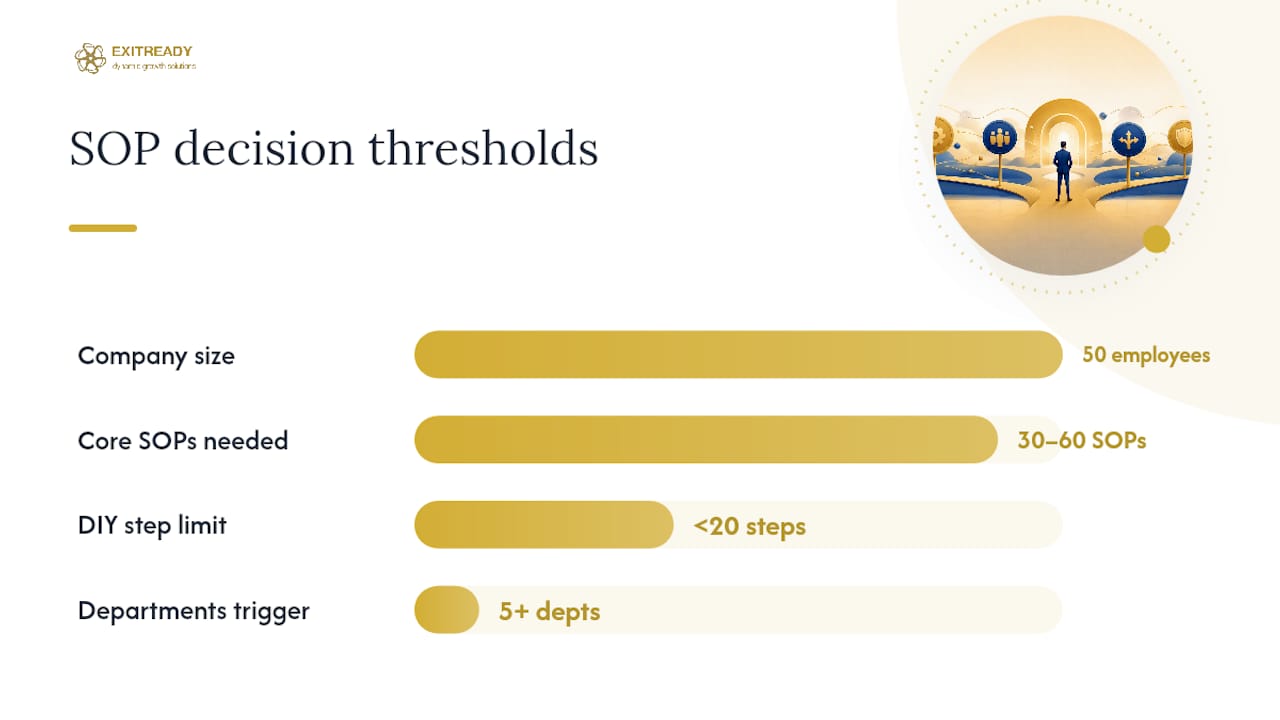
- The process is performed by one team, has fewer than 20 steps, and carries low financial or compliance risk.
- You have a subject matter expert who can draft or narrate the first version.
- The process is stable enough that it won’t change significantly in the next 12 months.
Hire help or adopt a structured system when:
- The process crosses departments and requires coordinated sign-off from multiple stakeholders.
- The process carries regulatory or audit risk (financial controls, safety procedures, data privacy).
- You are building an SOP library from scratch across 5 or more departments under time pressure.
- Owner dependency is the core problem: the owner is the process, and no written document exists.
A mid-market company with 50 employees and no documented processes typically needs 30–60 core SOPs to cover operations, finance, sales, and HR. Writing those from scratch internally, while running the business, takes 6–12 months. A structured business operating system accelerates that timeline significantly by providing templates, a documentation framework, and an implementation sequence that prioritizes the highest-risk processes first.
The Catalyst delegation-ready SOP model makes the case clearly: an SOP that includes ingredients, a trigger, a video walkthrough, and an owner-maintained FAQ is a delegation tool, not just a reference document. That distinction matters most when you are preparing a business for exit readiness. Buyers and acquirers want to see that the business runs without the owner. A library of well-maintained SOPs is one of the most concrete ways to demonstrate that.
For teams evaluating whether to bring in external help for complex, cross-functional SOP projects, a business transformation consultant simulation can clarify the scope and complexity before committing to a full engagement.
The part most guides skip
Most SOP guides focus on format and fields. The harder problem is adoption, and the reason most SOPs fail has nothing to do with how they are written.
The real issue is that SOPs are usually written after the fact, by someone who doesn’t do the task, stored somewhere inconvenient, and handed to staff with no context. Then leaders are surprised when nobody uses them.
The delegation-first approach flips that sequence. You write the SOP before you hand off the task, not after. You involve the person doing the work in the drafting session. You test it with someone who has never done the task before the SOP is published. And you assign a named owner whose job includes keeping it current.
That sequence produces a document that actually transfers knowledge. Start with one process, the one where your absence would cause the most disruption, and build from there. One working SOP is worth more than twenty filed and forgotten.
Dynamicgrowthsolutions can help you build SOPs that stick
Mid-market businesses that need more than a template need a system. Dynamicgrowthsolutions works with owners and leadership teams to build documented playbooks, delegation frameworks, and operational SOPs through the AOS (Accelerated Operating System), a structured approach that replaces owner dependency with self-sustaining operations.

The process starts with an operational assessment that identifies which processes carry the most risk and which are already ready to delegate. From there, the team builds a prioritized SOP library, trains staff on each procedure, and installs a review cadence that keeps documentation current. The result is a business that runs without the owner in the room, which is exactly what buyers, investors, and leadership teams need to see. If you are preparing for a premium exit or simply want to reclaim your time, explore the business operating system and see how the AOS framework applies to your operation. You can also check the 9 key benefits of operating system adoption to evaluate whether a structured system fits your current stage.
Sources
- Standard operating procedures: A writing guide
- Standard Operating Procedures (EPA guidance PDF)
- Standard operating procedures in research: Rule-based workflow (PLOS Computational Biology)
- How to Write SOPs: A Practical Step-by-Step Guide (Atlassian / Loom)