
Lead-to-cash mapping is the process of documenting every stage a prospect moves through, from first contact to collected payment, so you can see exactly where deals stall and cash gets delayed. Building one map exposes handoff losses that most leadership teams never quantify. The fastest way to get value is not a strategy offsite. It’s a one-page diagram, built this week, showing owners and service-level agreements at every handoff.
TL;DR:
- Most revenue leakage occurs at functional boundaries, especially between marketing and sales, and fixing these areas offers the most cost-effective improvements.
- Accurate data ownership assignments to specific systems, such as CRM for accounts and contacts or ERP for orders, are essential to prevent sync issues and revenue loss.
- Tracking just one or two KPIs per stage, like lead response time or DSO, helps identify bottlenecks quickly and facilitates faster decision-making.
- A two-day workshop using actual deal data can produce a practical lead-to-cash map with clear owners, SLAs, and exception procedures to improve process visibility.
- Turning the map into an operational process requires documented ownership and measurable SLAs, supported by a governance system to sustain improvements.
Table of Contents
- What Does a Lead-to-Cash Mapping Template Look Like?
- What Are the Stages of the Lead-to-Cash Process?
- Which System Should Own Each Piece of Data?
- Which KPIs Should You Track on the Map?
- How Do You Run a Lead-to-Cash Mapping Workshop?
- Where Do Lead-to-Cash Maps Usually Break?
- How Does a Documented Operating System Make Maps Work?
- The Mistake I See on Every Second Map
- Turn Your Map Into a Governed, Owned Process
- Sources
What Does a Lead-to-Cash Mapping Template Look Like?
Skip the theory and start with a shape you can copy onto a whiteboard or a Miro board this afternoon. A working lead-to-cash map is a swim-lane diagram: one horizontal lane per function (Marketing, Sales, Sales Ops, Fulfillment, Finance), with the deal moving left to right through eight stages. Each box on the lane needs four things attached to it, not just a label.
Here’s the checklist to fill in for every stage on your map:
- Artifact: the record that proves the stage happened (form submission, signed quote, purchase order, shipped confirmation, paid invoice).
- Canonical field set: the two or three data fields that must be accurate for the next system to trust the handoff (deal value, product SKU, billing address, contract term).
- Owner: the named role accountable for that stage, not “the sales team.”
- SLA: how long the stage should take before it counts as a bottleneck.
- Exception path: what happens when the SLA is missed (escalation, alert, manual review).
A simple numeric example shows why this matters. If the phases from lead capture to qualified opportunity, opportunity to signed quote, quote to order entry, and invoice to payment take successively longer times, your full lead-to-cash cycle includes both selling and collections, with collections often consuming the most calendar time. Map that timeline once and you immediately see that collections, not selling, is where most of your calendar time is going. Sales cycle length and DSO deserve equal billing on the diagram, but most maps only track the first one.
What Are the Stages of the Lead-to-Cash Process?
Lead-to-cash covers more ground than quote-to-cash or order-to-cash, which is why the acronyms get confused so often. SAP’s own process documentation frames lead-to-cash as spanning demand generation through order handling, splitting it into pre-sales work (contact to lead, lead to opportunity, opportunity to quote) and order handling. Quote-to-cash starts later, at the quote itself, and order-to-cash begins only once an order exists, covering fulfillment, invoicing, and payment. If your map only starts at the quote, you’re missing the two stages where most pipeline actually dies.
Here’s what belongs on your map, stage by stage:
- Capture: web forms, trade show scans, referrals, and paid channels, each tagged with source attribution so marketing can prove which channel produces revenue, not just leads.
- Qualify: the MQL to SQL handoff, governed by a lead-scoring model and clear routing rules by deal size, industry, or territory.
- Opportunity management: discovery calls, needs analysis, pricing conversations, and internal approval chains for anything outside standard terms.
- Quote/CPQ: configuration, pricing rules, discount approvals, and quote acceptance. CPQ is a distinct sub-process here, responsible specifically for configuration, pricing, and approvals, not a generic step inside “sales.”
- Order management and fulfillment: order orchestration, inventory checks, shipping or service delivery, and confirmation back to the customer.
- Invoicing and collections: invoice generation tied to contract terms, dispute handling, and payment reconciliation against the bank feed.
The boundary that trips up most teams is quote-to-order versus order-to-cash. A signed quote is not an order until it’s entered into the system that fulfillment and finance both trust. If your CPQ tool and your ERP disagree on what counts as a “closed” deal, that gap is exactly where revenue goes missing.
Which System Should Own Each Piece of Data?
A map is only as trustworthy as the data behind it, and data ownership fights are where most lead-to-cash projects quietly die. The fix is boring but effective: name one system of record per object before you argue about tools.
Assign canonical ownership like this:
- Account and contact: CRM, since it’s the standard system for capturing interactions and feeding qualified leads into the pipeline.
- Opportunity: CRM, through the close.
- Quote: CPQ, synced back to CRM on acceptance.
- Order: ERP or OMS, the moment a quote converts.
- Invoice: billing system or ERP, tied to contract metadata.
- Contract: CLM or a contract repository, referenced by ID everywhere else.
Keeping these systems in sync without creating duplicate orders or mismatched invoices requires more than a nightly batch job. Production-grade lead-to-cash architectures lean on hybrid integration patterns, API-led connectivity for real-time orchestration, event streams for durable handoffs, and outbox or change-data-capture patterns for transactional integrity. Pair that with reconciliation jobs and a dead-letter queue for failed syncs, and you catch data drift before it becomes a billing dispute.
Pro Tip: Sign off on system ownership in writing before you evaluate a single integration tool. Most technology failures on lead-to-cash projects are really unresolved ownership disputes wearing a technical disguise.
Which KPIs Should You Track on the Map?
Every stage on your map deserves a number attached to it, but not a dozen. The strongest lead-to-cash maps limit themselves to one or two KPIs per stage, since a long metrics checklist produces analysis, not action.
The core KPI chain to display, stage by stage:
- Lead response time: minutes or hours from capture to first sales touch.
- MQL to SQL conversion: percentage of marketing-qualified leads sales accepts.
- Win rate: percentage of qualified opportunities that close.
- Quote-to-order time: days between quote acceptance and order entry.
- Order-cycle time: days from order to delivery or activation.
- DSO (Days Sales Outstanding): days from invoice to cash received.
Statistic to build a habit around: a simple map paired with a tight KPI set, 1 to 2 indicators per stage rather than a long checklist, consistently produces faster decisions than dashboards tracking everything at once.
Review lead-response time and MQL to SQL conversion weekly, since they move fast and reveal routing problems early. Review quote-to-order time and DSO monthly, since finance and operations need a full billing cycle to see the trend. If you’re building your first map, start with MQL to SQL conversion, quote-to-order time, and DSO. Those three expose the handoffs where marketing, sales, and finance blame each other most often.
How Do You Run a Lead-to-Cash Mapping Workshop?
You don’t need a six-week consulting engagement to produce a usable map. A focused two-day workshop, with the right prework, gets you a governable diagram most teams can start using immediately.
- Prework: pull 10 to 15 closed deals from the last quarter, spanning fast wins and slow losses. Inventory every system touched (CRM, CPQ, ERP, billing) and list the data fields each one requires from the last stage.
- Draw the swim lanes: one lane per function, stages left to right, using the actual deals from prework rather than an idealized process.
- Map every handoff: mark the artifact, owner, and SLA at each transition point, especially where two systems have to agree on the same record.
- Capture exceptions: document what happens when a deal breaks the normal pattern, a custom quote, a credit hold, a partial shipment, since exceptions are where most SLA breaches hide.
- Assign owners by name: not by department. A stage with no named owner will drift within a quarter.
The workshop should produce five concrete deliverables: the map file itself, a canonical data table listing each object and its system of record, an owner register, an SLA matrix showing target versus actual time per stage, and a reconciliation runbook for when systems disagree. Skip any of these five and the map turns into a wall decoration within two months.
Where Do Lead-to-Cash Maps Usually Break?
Most revenue leakage on a lead-to-cash map clusters at four predictable points, and consultancy engagements consistently find that more than half of all loss points occur at functional boundaries rather than inside any single team’s work.
- Marketing to Sales: vague MQL and SQL definitions cause routing delays and leads that sales reps ignore.
- Sales to Order: CPQ and ERP master-data mismatches produce quotes that can’t actually be fulfilled as priced.
- Order to Fulfillment: capacity and inventory gaps turn a clean order into a broken promise to the customer.
- Invoice to Cash: missing contract metadata and unresolved disputes stall reconciliation and inflate DSO.
Pro Tip: Fix the marketing to sales boundary first. It’s the cheapest to repair, usually a shared lead-scoring definition and an SLA gate, and it clears the noise that makes every downstream stage harder to diagnose.
How Does a Documented Operating System Make Maps Work?
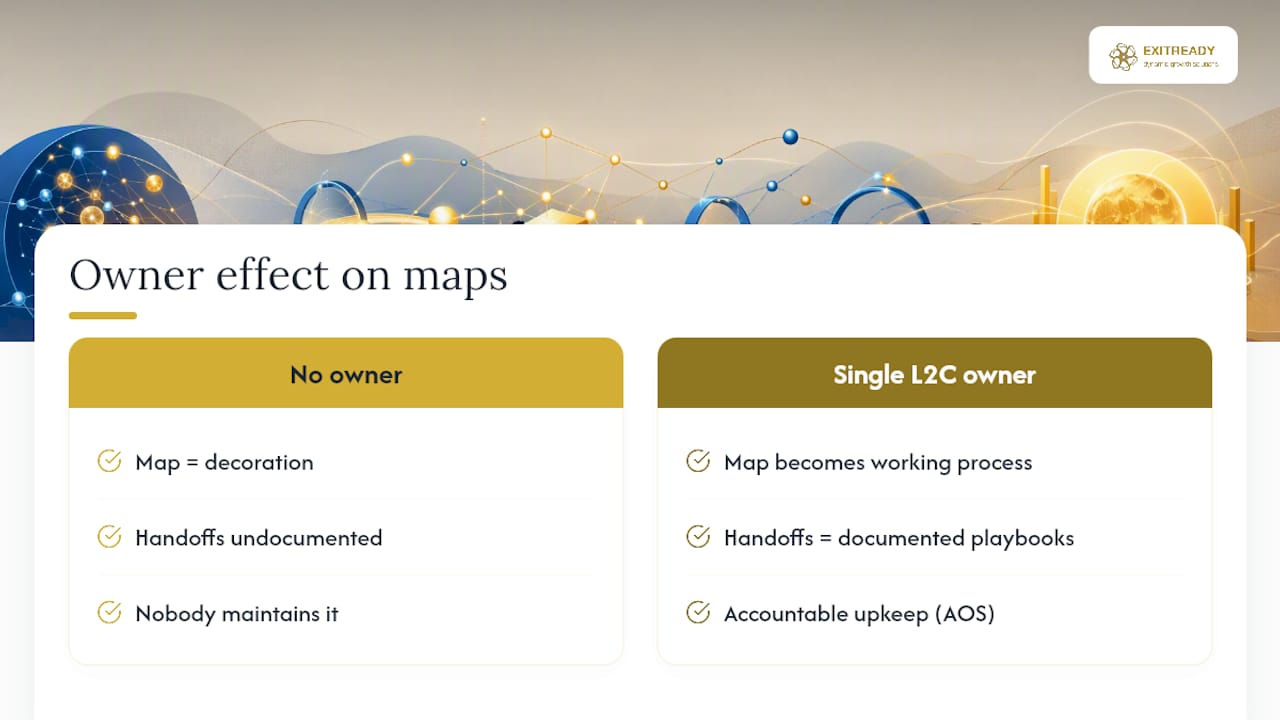
A diagram without an owner is decoration. Naming a single L2C owner accountable for the full chain is what converts a static map into a working process. Dynamicgrowthsolutions builds this ownership directly into its AOS operating system, turning each handoff into a documented, accountable playbook instead of a diagram nobody maintains.
The Mistake I See on Every Second Map
Most lead-to-cash maps I review are gorgeous and useless. Leaders spend three weeks on the diagram and skip the two decisions that actually matter: who owns each handoff, and which two KPIs get reviewed weekly. If you’re pressed for time, skip the artwork. Name the owners and pick your KPIs first.
— Andre
Turn Your Map Into a Governed, Owned Process
A diagram tells you where the breaks are. Fixing them for good takes documented ownership, not another workshop that gets filed away. Dynamicgrowthsolutions built AOS specifically to replace ad hoc process knowledge with certified playbooks, so the handoffs your map exposes get an accountable owner and a measured SLA, not a promise to “circle back.”

A typical engagement starts with an operational assessment of your current lead-to-cash flow, moves into documented playbooks for each handoff, and ends with certification so the process runs without you standing over it. Owners see faster quote-to-order times and tighter DSO within a couple of quarters, because the ownership gaps that caused the delays are gone. If your lead-to-cash map has already told you where the money is stuck, the next step is fixing it with a system built to hold. Start with the business transformation framework overview to see how AOS turns your map into a governed runbook.
Sources
- Describing the SAP Lead to Cash Business Process and its Stages
- Lead-to-Cash: The End-to-End Revenue Process
- Monday
- Lead-to-Cash Process Mapper