
A daily huddle is a 10 to 15 minute standing check-in that aligns priorities and surfaces blockers before they cost a day. The one rule that determines whether it works: hold a strict timebox and take any real problem-solving offline. Managers who enforce both consistently get a fast, low-cost coordination tool; managers who don’t end up running a second status meeting nobody wants.
TL;DR:
- Using a fixed, concise agenda focused on good news, metrics, top priorities, and blockers ensures a daily huddle stays efficient within the 12-15 minute timebox.
- A designated facilitator, a clock watcher, and clear ground rules like headline updates and offline problem-solving are essential to prevent drifting or meeting fatigue.
- Enforcing strict participation rules such as cameras on for remote teams and keeping follow-ups on a shared board increases engagement and accountability.
- Tracking huddle duration and blocker resolution speed over time helps determine if the format is effective or needs adjustment to sustain value.
- Documenting the huddle process, roles, and connection to leadership reviews makes the ritual durable and adaptable beyond individual managers.
Table of Contents
- What Should a Daily Huddle Agenda Cover?
- Who Runs the Huddle and What Are the Ground Rules?
- How Do You Run an Effective Remote or Hybrid Huddle?
- How Do You Facilitate a 12-Minute Huddle Step by Step?
- How Do You Connect Huddles to Metrics and OKRs?
- What Kills Daily Huddles, and How Do You Fix It Fast?
- Ready-to-Use Agendas by Team Size
- Making the Huddle Durable Inside an Operating System
- What Are the Real Benefits of a Daily Huddle?
- How Do You Keep People Engaged During a Huddle?
- How Do You Follow Up on Action Items From a Huddle?
- How Do You Know If Your Huddle Is Actually Working?
- Daily Huddle Meetings for Managers: The Part Everyone Skips
- How Dynamic Growth Solutions Helps Huddles Stick
- Sources
What Should a Daily Huddle Agenda Cover?
Most huddles fail from having too much agenda, not too little. The fix is a fixed structure with a fixed clock, repeated the same way every day so nobody has to think about format, only content.
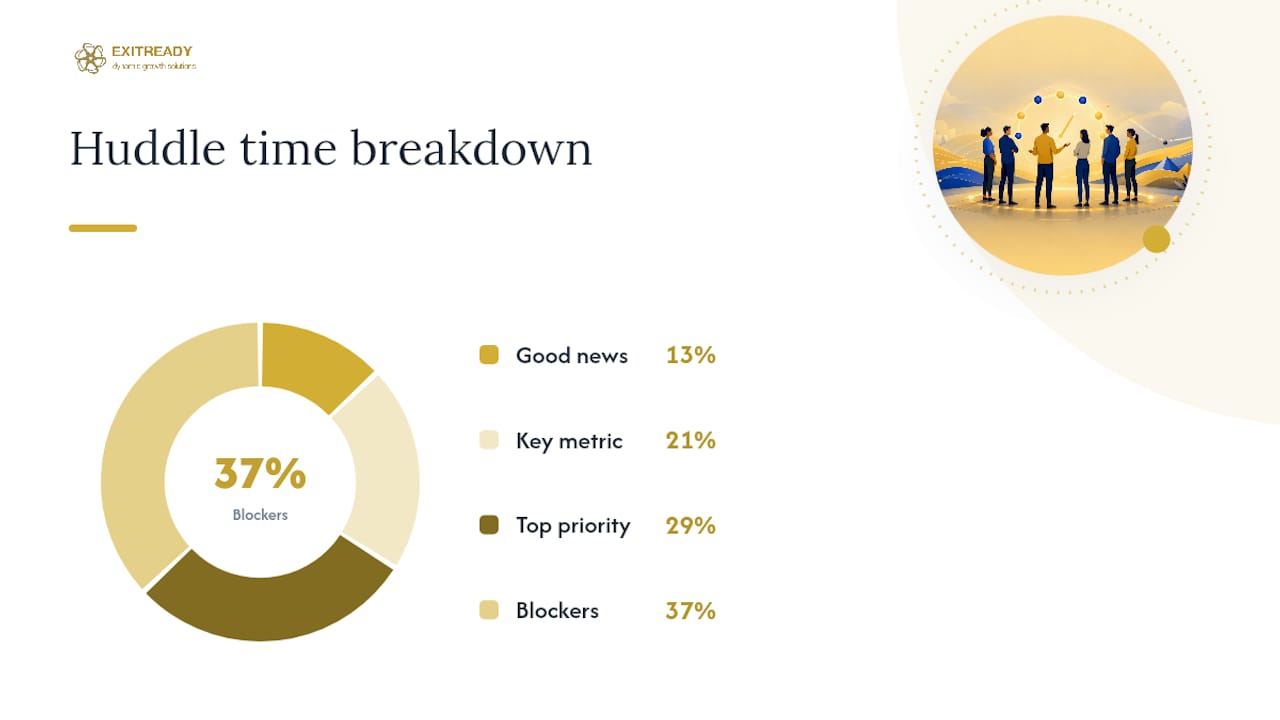
The most reliable business-focused template is the four-part agenda popularized by operations and leadership consultants: good news, metrics, top priority, and blockers. It works because it opens with a quick morale note, grounds the team in a number that matters, forces a single priority instead of a list, and ends with the one thing that actually needs group attention.
Four-part agenda (12 to 15 minutes):
- Good news or wins (1 to 2 minutes): one quick item, no rambling
- Key metric check (2 to 3 minutes): one number per person or team, not a full report
- Top priority for the day (3 to 4 minutes): what each person is committing to before the next huddle
- Blockers (4 to 5 minutes): name the blocker and the owner, don’t solve it live
Software and cross-functional teams often prefer the leaner three-question format popularized by Scrum, focusing on progress, plans, and blockers. It strips out the metrics check and works well for teams already tracking a dashboard elsewhere.
How to pick between them:
- Use the four-part agenda for sales, operations, or leadership teams that need a metric anchor and morale touchpoint.
- Use the three-question format for engineering or product teams already living inside a project board.
- Cut either format to two parts (priority and blockers) for teams smaller than five people who talk daily anyway.
- Add a fifth slot only for cross-functional teams that need a 60-second handoff check between departments.
Whichever version you run, the structured business huddle format exists specifically to prevent daily work from fragmenting into a dozen ad hoc Slack threads later in the day.
Who Runs the Huddle and What Are the Ground Rules?
Every huddle needs one person driving it, one person watching the clock, and everyone else giving headline-only updates. Skip any of those three roles and the meeting drifts.
The facilitator opens the huddle, calls on people in order, and cuts off tangents with a firm “let’s take that offline.” Rotating the facilitator role among team members, rather than always defaulting to the manager, tends to raise ownership and buy-in. A new facilitator should shadow two or three sessions before running one solo. A separate timekeeper, even an informal one calling out “two minutes left,” keeps the group honest without the facilitator having to break flow to check a clock.
Ground rules worth posting somewhere visible:
- Updates are headlines, not stories. If it needs more than 30 seconds, it goes on the “offline” list.
- No solving problems live. Name it, assign an owner, move on.
- Attendance is for people with a stake in today’s coordination, not everyone tangentially related to the project.
- Once a group grows past 10 to 12 people, split into sub-huddles by dependency rather than trying to fit everyone into one room.
Pro Tip: Give your rotating facilitators a three-item checklist taped to the meeting room wall or pinned in the group chat: open on time, enforce the order of speakers, close with a recap of who owns what. That alone prevents most first-time facilitator stumbles.
How Do You Run an Effective Remote or Hybrid Huddle?
Distance kills a huddle faster than almost anything else, because it’s easy to half-listen on mute while checking email. The fix isn’t more structure, it’s stricter enforcement of the structure you already have.
Cameras on is non-negotiable for hybrid teams. Enforcing video and a shared, live visual board levels participation between the people in the room and the people dialing in, and it stops the huddle from becoming a passive broadcast for remote attendees. Pair that with a fixed meeting link, a fixed time (accounting for time zones if the team spans more than one), and a board everyone can see and edit in real time, not just the facilitator.
Remote/hybrid checklist:
- Same link, same time, every day — no rotating calendar invites
- Cameras on for anyone joining remotely
- A shared board (Trello, a Notion page, a whiteboard tool) visible to everyone before the huddle starts
- A designated “walk the board” pattern where the facilitator moves through open items instead of asking each person to report individually
- A dedicated channel or thread for follow-ups so blockers raised at 9:05 AM don’t vanish into a chat scroll
Not every team needs a synchronous huddle every day. Teams working across wide time zone gaps sometimes run an asynchronous version, posting the same four answers in a shared channel by a set time instead of gathering live. That trades real-time energy for inclusivity, and it works fine for teams whose blockers are rarely urgent enough to need a live conversation.
One caution worth building into your remote setup: Atlassian’s stand-up playbook notes that distributed teams need explicit prep steps, like posting your update in advance, precisely because remote settings make it easier to show up unprepared and stall the group.
How Do You Facilitate a 12-Minute Huddle Step by Step?
Improvising a huddle is how a 12-minute meeting becomes a 25-minute meeting. A script removes the guesswork.
Before the huddle (5 minutes prior):
- Open the shared board and confirm it reflects yesterday’s closed items.
- Glance at the one metric you’ll surface today.
- Note who’s out and who might need to speak first because they have a hard blocker.
Minute-by-minute script:
- Minute 0 to 1, opening: “Good morning, everyone. Twelve minutes, same order as always. Let’s start with a quick win.” This signals the clock is running and sets expectations immediately.
- Minute 1 to 3, good news: Call on one or two people. Keep it light. Cut off anything turning into a story with, “Love it, let’s keep moving.”
- Minute 3 to 5, metric check: Point to the number on the shared board. “We’re at X against a target of Y. Anyone need to flag something tied to this?” One follow-up question max.
- Minute 5 to 9, priorities: Go around the room (or the board) in a fixed order, either by role or by walking the task board left to right. Each person states their one priority in one sentence. If someone drifts into detail, say, “Got it, let’s park the details and take it offline after.”
- Minute 9 to 11, blockers: Ask directly, “Any blockers today?” When someone names one, assign an owner on the spot: “Can you two grab five minutes after this?” Do not attempt to resolve it in the huddle.
- Minute 11 to 12, close: Recap owners and next steps in one sentence each. “Great, see everyone tomorrow, same time.”
Capture blockers on the shared board as they’re named, tagged with an owner and a due date, not just a note that something’s wrong. That single habit, more than any agenda tweak, is what separates huddles that actually unblock work from huddles that just document that work is blocked.
How Do You Connect Huddles to Metrics and OKRs?
A huddle without a number is just a chat. The trick is surfacing one figure, not five, so the metric check stays inside its two or three minute window.
Teams that tie their daily huddle to a single visible metric or key result tend to hold better strategic alignment than teams that review scattered dashboards. Pick the one lead indicator that actually predicts whether the week goes well, whether that’s calls booked, tickets closed, or units shipped, and put it on the board every single day.
What to check in under 3 minutes:
- One lead indicator (not a lagging report) posted where everyone can see it
- A one-line OKR progress note, phrased as “on track,” “at risk,” or “off track,” not a full readout
- Confirmation that today’s top priority actually maps to this quarter’s key result, not just to what’s loudest in the inbox
This is also where the huddle earns its keep as a filter. If someone’s stated top priority has nothing to do with the quarter’s goals, that’s the moment to redirect it, not three weeks later during a performance review.
What Kills Daily Huddles, and How Do You Fix It Fast?
Most broken huddles die from the same handful of causes, and each has a same-day fix.
- Status reporting instead of coordination. People read from a list of tasks nobody else needs. Fix: replace “what I did” with “what I need from someone else today.”
- Problem-solving happens live. A blocker turns into a 10-minute debugging session. Fix: the facilitator says “take it offline” and assigns a follow-up on the spot, every time, no exceptions.
- The meeting runs long. When huddles regularly blow past 15 minutes, the cause is almost always unresolved blockers being worked live or the group being too large. Fix: split into sub-huddles or enforce a strict 45-second cap per person’s update.
- Attendance creep. People join “just in case” and stop contributing. Fix: audit the invite list monthly and remove anyone who hasn’t spoken in two weeks.
- The energy is flat. Same order, same tone, every day. Fix: rotate who speaks first, or rotate the facilitator.
Judge whether a fix worked by tracking two things for a week: did the huddle end on time, and did yesterday’s flagged blockers actually get resolved by the next huddle. If both are still failing after two weeks of trying fixes, the format itself is wrong for your team’s size or workflow, and it’s worth redesigning from scratch rather than patching further.
Ready-to-Use Agendas by Team Size
Copy any of these directly into a calendar invite or a pinned team doc.
Team of 3 to 5 (10 minutes): Skip the metrics slot. Go straight to priority and blockers for each person, one sentence each.
Team of 6 to 10 (12 to 15 minutes): Use the full four-part agenda: good news, metric, priority, blockers.
Team of 10+ (12 minutes, split structure): Run a single leadership huddle among team leads, each of whom already ran a sub-huddle with their own group minutes earlier.
Facilitator open script: “Morning, team. Twelve minutes, same format. Let’s start with a win before we get into it.”
Take-it-offline script: “That sounds like it needs real digging. Can you two connect for ten minutes after this and report back tomorrow?”
First 10 huddles checklist:
| Huddle # | Focus |
|---|---|
| 1 to 2 | Introduce the agenda format and ground rules out loud |
| 3 to 4 | Start enforcing the timebox strictly, even if it feels rushed |
| 5 to 6 | Rotate the facilitator role for the first time |
| 7 to 8 | Introduce the shared metric or OKR check |
| 9 to 10 | Review as a team: is this working, what needs adjusting |
Ten repetitions is roughly the point where a huddle stops feeling like a new meeting and instead starts feeling like a habit nobody questions anymore.
Making the Huddle Durable Inside an Operating System
A huddle that lives only in one manager’s head disappears the moment that manager takes a vacation or leaves. Write it down: the timing, the four-part agenda, who facilitates this week, and which board is required reading before anyone speaks. A documented huddle playbook survives staff turnover; a habit passed along by word of mouth does not.
The bigger leverage point is connecting the huddle to your leadership cadence, not letting it float as an isolated ritual. When a blocker surfaced at 9:05 AM has a clear path to a weekly leadership review, follow-ups actually happen instead of quietly dying in a chat thread.
- Document timing, agenda, current facilitator, and required board in a shared, version-controlled doc
- Link huddle blockers to a weekly or monthly leadership check-in so nothing gets orphaned
- Assign a named owner for “huddle health,” someone who audits attendance and timing monthly
A leadership alignment workshop is often the fastest way to get a documented ritual like this adopted across multiple teams at once, rather than reinventing the format department by department.
Pro Tip: Treat your huddle playbook the same way you’d treat an onboarding document. If a new hire can’t run the huddle correctly just by reading it, the playbook isn’t finished yet.
What Are the Real Benefits of a Daily Huddle?
Three benefits show up consistently once a huddle is run correctly, and none of them are about the meeting itself.
Coordination. A huddle replaces a dozen scattered “quick questions” with one predictable window where everyone already knows the format and expects to speak briefly. That predictability is what actually saves time, not the meeting’s short length alone.
Unblocking. Naming a blocker out loud, in front of the group, with an owner assigned on the spot, moves it from someone’s private frustration to a tracked item with a deadline. Blockers that sit unspoken for two days get resolved the same day once they’re surfaced this way consistently.
Visibility. A manager running five one-on-ones a week gets five fragmented views of the team. A manager running daily huddles gets one compounding view, built five minutes at a time, of who’s overloaded, who’s stuck, and where the week is actually heading.
The research consistently points to the same conclusion: a structured 15-minute huddle tends to eliminate hours of the informal catching-up that otherwise happens through hallway conversations and scattered messages. The huddle isn’t adding a meeting to the calendar, it’s replacing several unstructured ones that were already happening anyway.
How Do You Keep People Engaged During a Huddle?
Engagement drops fast in any meeting that runs on autopilot, and a daily huddle is especially vulnerable because the repetition that makes it efficient can also make it forgettable.
Rotating who speaks first is the simplest fix. If the same person always opens, everyone else mentally checks out until their turn. Some facilitators use a “last arrival speaks first” rule, others pass a physical or virtual token to decide order, both borrowed from established stand-up facilitation patterns. Either approach breaks the predictable sequence that lets people tune out.
Calling on people by name rather than waiting for volunteers also matters more than it sounds. “Sarah, what’s your priority today?” gets a faster, sharper answer than an open “anyone want to go next?” which tends to produce silence followed by the loudest person talking twice.
Recognition helps too, but it has to stay genuinely brief. A 15 second callout for someone who cleared a blocker yesterday reinforces that the huddle rewards follow-through, not just attendance. Save the longer praise for a one-on-one or a team channel.
Finally, resist the urge to lecture. If a manager uses the huddle to deliver a two-minute reminder about deadlines or policy, attention drops the next day before the meeting even starts. Save announcements for a separate weekly team check-in and keep the daily huddle strictly operational.
How Do You Follow Up on Action Items From a Huddle?
A blocker named in the huddle and never revisited teaches the team that naming blockers doesn’t matter. Follow-up is what makes the whole format worth running.
The shared board used during the huddle should double as the follow-up tracker, not a separate spreadsheet nobody opens. When a blocker gets an owner assigned live, that owner’s name and a due date go directly onto the board item, visible to the whole team, not just noted verbally and forgotten.
The next day’s huddle is the natural checkpoint. Before moving to new blockers, the facilitator glances at yesterday’s list and asks, “Did we clear the API issue from yesterday?” That one habit, closing the loop before opening new items, is often the single biggest difference between a huddle that solves things and one that just lists problems daily.
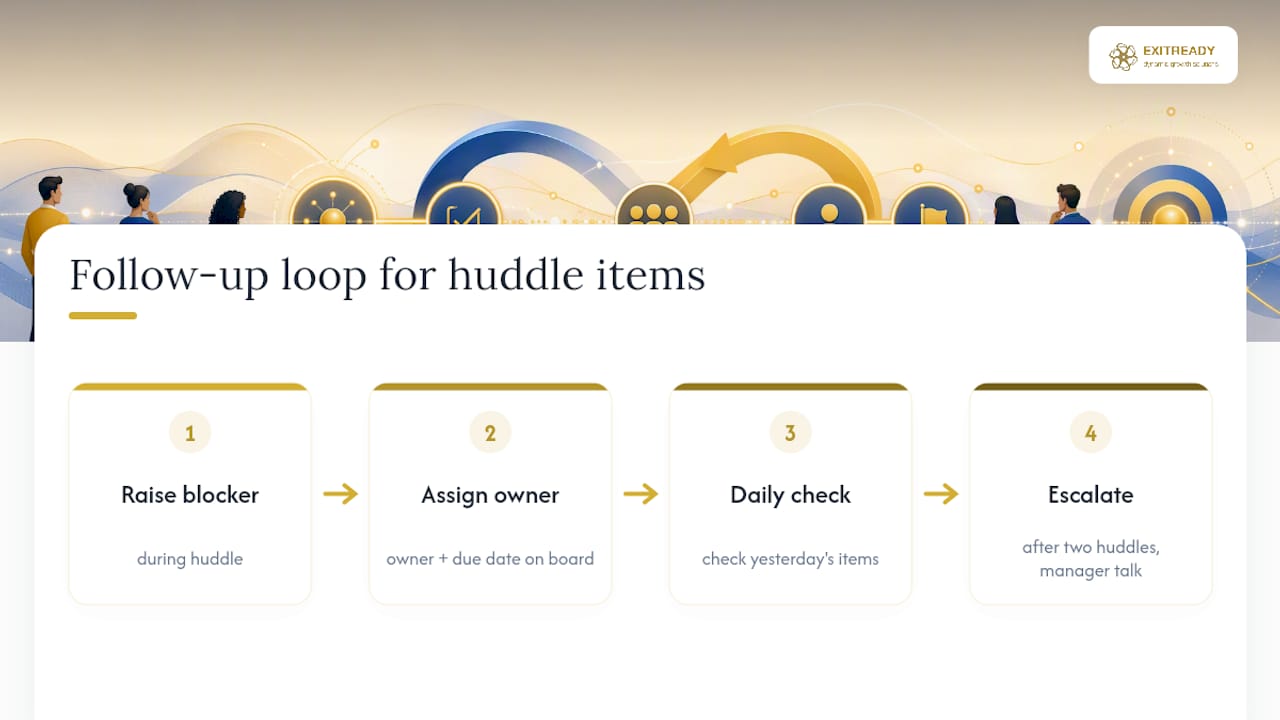
For blockers that stretch beyond a day or two, don’t let them live only in the huddle. Escalate anything unresolved after two huddles to a direct conversation between the owner and the manager, outside the group setting. The huddle is for surfacing and assigning; it’s not built to carry a multi-day problem on its agenda every single morning.
How Do You Know If Your Huddle Is Actually Working?
Two numbers tell most of the story: how often the huddle ends on time, and how often blockers named on day one get resolved by day two or three.
Track huddle length for two weeks without saying anything to the team. If it’s consistently running 18 to 20 minutes instead of the intended 12 to 15, that’s a format problem, not a discipline problem, and it usually traces back to live problem-solving or a group that’s grown too large.
Blocker resolution speed is the second signal. Keep a running tally of how many blockers get closed within 24 hours of being raised versus how many linger for a week or more. A huddle that surfaces blockers but never clears them faster than before it existed isn’t adding value, it’s just adding a meeting.
A quick, informal pulse check every month or two, five minutes, three questions, does more good than any formal survey: Is the timebox holding? Are blockers actually getting resolved faster? Does anyone feel like their update is being ignored? Adjust the agenda based on what comes back, whether that means dropping the good news segment because it’s dragging, or adding a second metric because the team asked for it. A huddle format frozen in place after month one usually starts losing relevance by month three.
Daily Huddle Meetings for Managers: The Part Everyone Skips
Most advice on this topic obsesses over the agenda and barely mentions the discipline required to keep running it once the novelty fades. That’s backwards. The format matters less than whether a manager actually enforces the timebox on day 47, not just day 3.
The conventional wisdom oversells variety, three-question format here, four-part agenda there, as if picking the right template solves engagement. It doesn’t. Engagement comes from consistency: same time, same order, same visible follow-through on yesterday’s blockers. A team that trusts the huddle will surface a problem again tomorrow if it’s not solved today; a team that’s watched blockers vanish into silence stops mentioning them at all.
What the reader should prioritize first isn’t the perfect agenda, it’s building the muscle to say “take it offline” without flinching, every single time, even when the conversation is interesting. That single habit, repeated for ten straight huddles, does more for a team’s coordination than any agenda redesign. Everything else, the metric check, the rotating facilitator, the shared board, is scaffolding around that one discipline.
— Andre
How Dynamic Growth Solutions Helps Huddles Stick
A well-run huddle solves today’s coordination problem. It doesn’t automatically survive a busy quarter, a new hire, or a manager switching teams, unless it’s written down and tied to something bigger than one person’s habit. That’s the gap most teams hit around month three, and it’s exactly where a documented operating system earns its cost over ad hoc effort.

Dynamicgrowthsolutions works with mid-market leadership teams to turn rituals like the daily huddle into documented playbooks that outlast any single manager, connected directly to leadership cadence, ownership assignments, and the metrics that actually predict quarterly performance. Instead of a huddle format that quietly drifts once the person who built it gets pulled onto something else, you get a system built to run without you in the room. If you’re ready to see how a documented operating cadence fits your team’s size and structure, review business transformation best practices and book an assessment to map out what a durable version looks like for your leadership team.
Sources
- It’s Not Just Standing Up: Patterns for Daily Standup Meetings
- Stand up meetings for team communication and collaboration | Atlassian
- Team Huddle: Complete Guide With Agenda & Templates